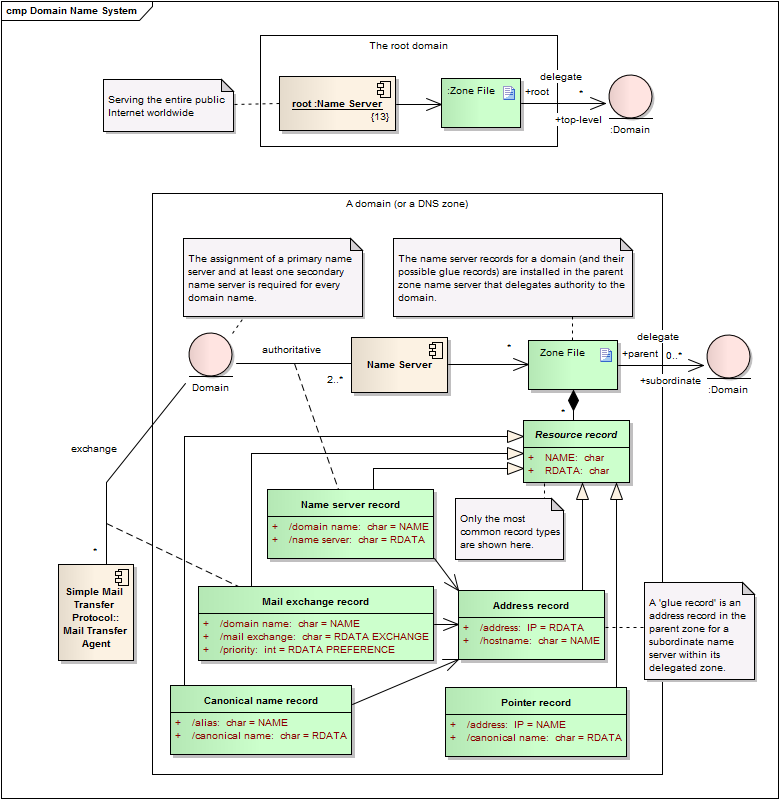
When you enter a website name in a browser, the page usually appears within seconds. Behind that simple action is a distributed system that helps your device find the correct server. This system is the Domain Name System (DNS). Without it, people would need to remember numerical IP addresses for every website and online service they use.
What Is DNS?
DNS maps human-readable domain names to network addresses that computers use to communicate. It is often compared to a phone book, but it is more accurately a globally distributed hierarchy of servers and records. No single server stores every domain. Instead, responsibility is delegated across the DNS hierarchy, allowing the system to scale as the internet grows.
How a DNS Lookup Works
When a browser needs the address for a domain, it typically follows several steps. Caches may shorten the process if the answer has already been stored and its time-to-live (TTL) has not expired.
- Local cache: The browser and operating system check whether they already know the address.
- Recursive resolver: If no valid local answer exists, the device asks a recursive resolver, often provided by an internet service provider or a public DNS service.
- Root server: The resolver asks where to find the name servers responsible for the relevant top-level domain, such as .com or .id.
- TLD server: The top-level-domain server points the resolver to the domain’s authoritative name servers.
- Authoritative name server: The authoritative server returns the requested record, such as an IPv4 or IPv6 address.
- Connection: The resolver returns the answer to the client, which can then connect to the destination server.
This is a simplified view of a typical lookup. Real systems may use cached referrals, multiple queries, and additional records depending on the domain and the service being accessed.
Common DNS Record Types
- A: Maps a name to an IPv4 address.
- AAAA: Maps a name to an IPv6 address.
- CNAME: Makes one DNS name an alias of another name.
- MX: Identifies mail servers responsible for receiving email for a domain.
- TXT: Stores text values used for verification and email-security policies such as SPF and some domain ownership checks.
- NS: Identifies the name servers authoritative for a DNS zone.
The correct record depends on the service being configured. A mistake can make a website unreachable, send email to the wrong provider, or interfere with domain verification.
DNS Security and Privacy
Traditional DNS queries are not encrypted by default, which can expose lookup information to observers on the network path. DNSSEC adds digital signatures that help resolvers verify the authenticity and integrity of DNS data. It does not encrypt queries or hide the domains being requested.
DNS over HTTPS (DoH) and DNS over TLS (DoT) encrypt the connection between a client and a resolver. They can reduce passive observation and some forms of tampering on the local network, but they do not make browsing anonymous: the resolver still receives the queries, and websites see the connections made to them.
Choosing a DNS Resolver
Public resolvers may offer useful performance, reliability, filtering, or privacy controls, but the best option depends on your location, network, and preferences. Compare response times from your own connection, review the provider’s logging and retention policy, and understand whether security filtering or parental controls are enabled. Changing DNS does not automatically make an internet connection faster; the difference depends on resolver latency, caching, and the rest of the connection path.
Conclusion
DNS is a core part of how the internet locates services. Understanding recursive resolution, authoritative servers, common record types, DNSSEC, and encrypted DNS helps users configure domains and networks more safely. For a practical technical overview, read the Cloudflare guide to DNS.
Komentar (0)
Belum ada komentar. Jadilah yang pertama berkomentar.