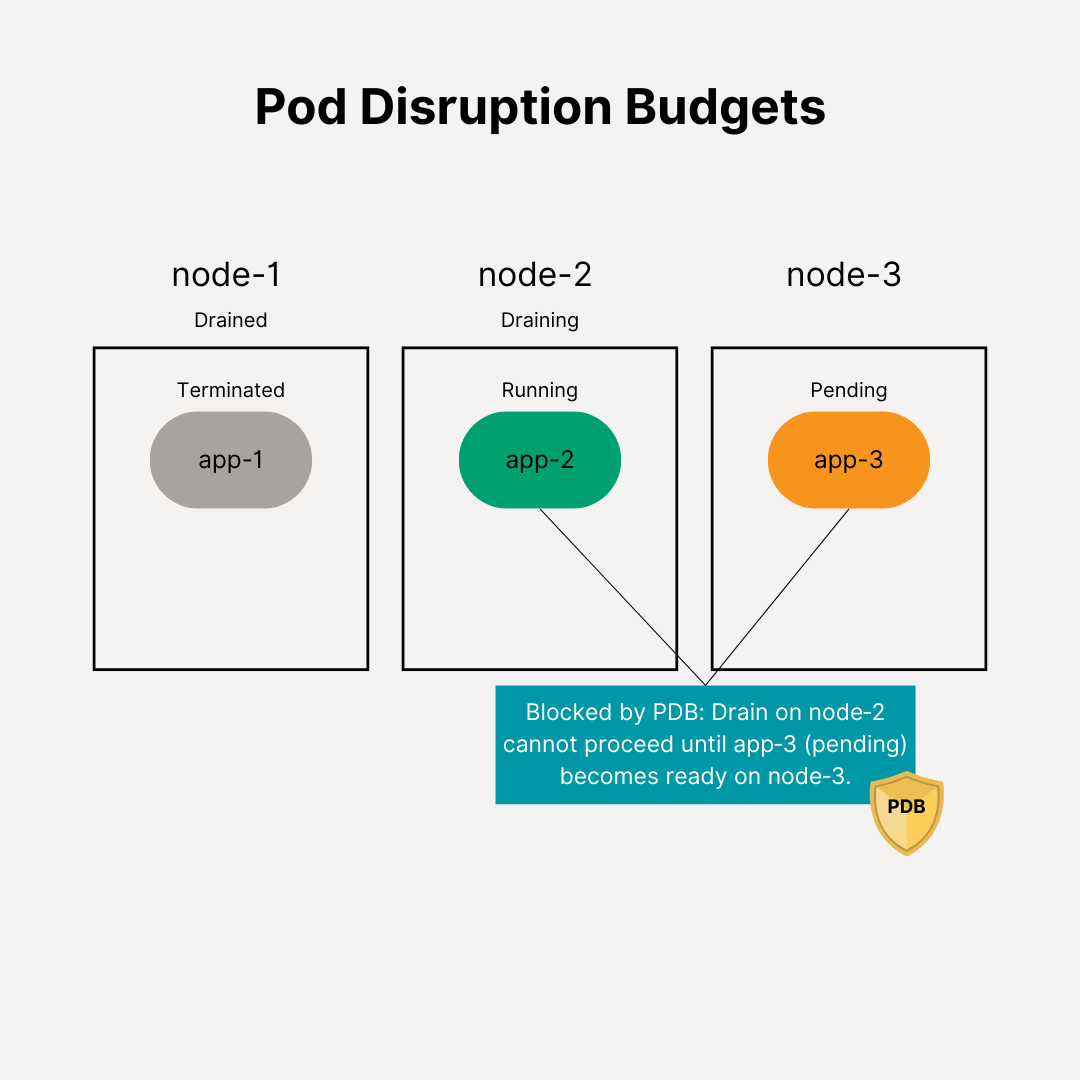
Keeping applications available isn’t just about running multiple replicas. When Kubernetes nodes need to be upgraded, drained, or scaled down, multiple Pods can be terminated almost simultaneously if the process isn’t controlled. As a result, services that technically have replicas can lose capacity or even stop serving requests. Pod Disruption Budget (PDB) helps limit these voluntary disruptions by defining how many Pods can be unavailable at any given time.
PDB is useful for teams managing production applications, especially when cluster maintenance is performed regularly. However, this feature doesn’t guarantee that applications will always stay alive. PDB needs to be combined with sufficient replicas, application readiness checks, Pod distribution across nodes, and tested recovery procedures.
What is a Pod Disruption Budget?
Pod Disruption Budget is a Kubernetes object that sets limits on disruptions to a set of Pods selected via a label selector. Generally, PDB governs voluntary disruptions, such as when an administrator runs kubectl drain to maintain a node. Kubernetes uses these rules to determine whether a Pod eviction request should proceed or must wait until healthy capacity is restored.
PDB differs from rolling update strategies on Deployments or StatefulSets. PDB primarily protects the eviction process through the Eviction API, while settings like maxUnavailable and maxSurge on Deployments control replica replacement during application updates. The two complement each other rather than replace one another.
Voluntary and Involuntary Disruptions
Examples of voluntary disruptions include draining nodes for upgrades, cluster capacity reduction, or administrator-initiated maintenance. In these situations, PDB can temporarily reject evictions if the number of healthy Pods would drop below the configured threshold.
Involuntary disruptions include hardware failures, node connectivity loss, or Pods being terminated due to resource pressure. PDB cannot prevent these events, although affected Pods still count toward availability calculations. Therefore, critical applications should have replicas spread across multiple nodes or zones rather than relying solely on a single PDB.
Choosing minAvailable or maxUnavailable
PDB configuration provides two mutually exclusive approaches. minAvailable sets the minimum number or percentage of Pods that must remain available. Conversely, maxUnavailable sets the maximum number or percentage of Pods that may be unavailable due to disruptions covered by the PDB.
For example, a web application has three replicas. Setting minAvailable: 2 means at least two Pods must remain available when Kubernetes considers voluntary evictions. Alternatively, maxUnavailable: 1 states that at most one Pod may be unavailable in such conditions. Choose whichever approach is easiest to understand and best fits your service requirements.
Avoid setting overly strict limits without considering cluster capacity. A PDB that demands all Pods always be available can cause drain operations to stall when there’s no room to evict even a single Pod. Conversely, a budget that’s too loose may allow concurrent disruptions that significantly reduce service capacity.
PDB Configuration Example
Here’s a simple example for an application whose Pods have the label app: catalog. Ensure the selector labels actually match the labels on Pods managed by the Deployment.
apiVersion: policy/v1
kind: PodDisruptionBudget
metadata:
  name: catalog-pdb
spec:
  minAvailable: 2
  selector:
    matchLabels:
      app: catalog
Save the configuration as catalog-pdb.yaml, then apply it with kubectl apply -f catalog-pdb.yaml. Check the results with kubectl get pdb and kubectl describe pdb catalog-pdb. Note the current number of healthy Pods, the desired minimum, and the number of disruptions allowed. Don’t assume the object succeeded just because the apply command showed no errors.
Safer Deployment Steps
- Ensure sufficient replicas. PDB doesn’t create additional Pods. If there’s only one replica, a budget requiring one Pod to remain available will prevent voluntary evictions but won’t solve the redundancy requirement.
- Align label selectors. Incorrect selectors can leave PDBs not protecting the intended workloads. Match selectors with actual Pod labels, not just Deployment names.
- Test the maintenance process. In staging environments, drain nodes and observe whether evictions proceed as expected. Prepare timeouts and rollback procedures if operations stall.
- Check unhealthy Pod conditions. Pods that continuously fail readiness checks can cause drains to wait. Kubernetes provides the
unhealthyPodEvictionPolicy; theAlwaysAllowoption can help evict unhealthy Pods when nodes need to be drained, but this decision should be weighed against application risks. - Measure service impact. Monitor error rates, latency, ready replica counts, and node capacity during maintenance. A technically valid budget may not be sufficient to meet service targets.
Common Mistakes
A common mistake is assuming PDB prevents all Pods from being deleted. Direct deletion of Pods or Deployments can bypass budget checks, and PDB doesn’t block accidental node failures. Other errors include using mismatched selectors, setting the minimum equal to all replicas without additional capacity planning, or not monitoring PDB status before cluster upgrades.
If kubectl drain stalls, don’t immediately force-delete Pods. Check PDB status, replica readiness, events, and whether other nodes have capacity to reschedule Pods. Forcing deletion might speed up maintenance but can also remove intentionally designed availability protections.
Conclusion
Pod Disruption Budget helps maintain application capacity during Kubernetes maintenance by limiting voluntary disruptions. Set limits based on service requirements, validate selectors, ensure replicas are well distributed, and test drain procedures before applying them in production. Use PDB as one layer in your availability strategy—alongside readiness probes, sufficient replicas, monitoring, and recovery plans—not as a replacement for everything.
Official references: Kubernetes Documentation: Disruptions and Pod Disruption Budget and PodDisruptionBudget API Reference.
Komentar (0)
Belum ada komentar. Jadilah yang pertama berkomentar.