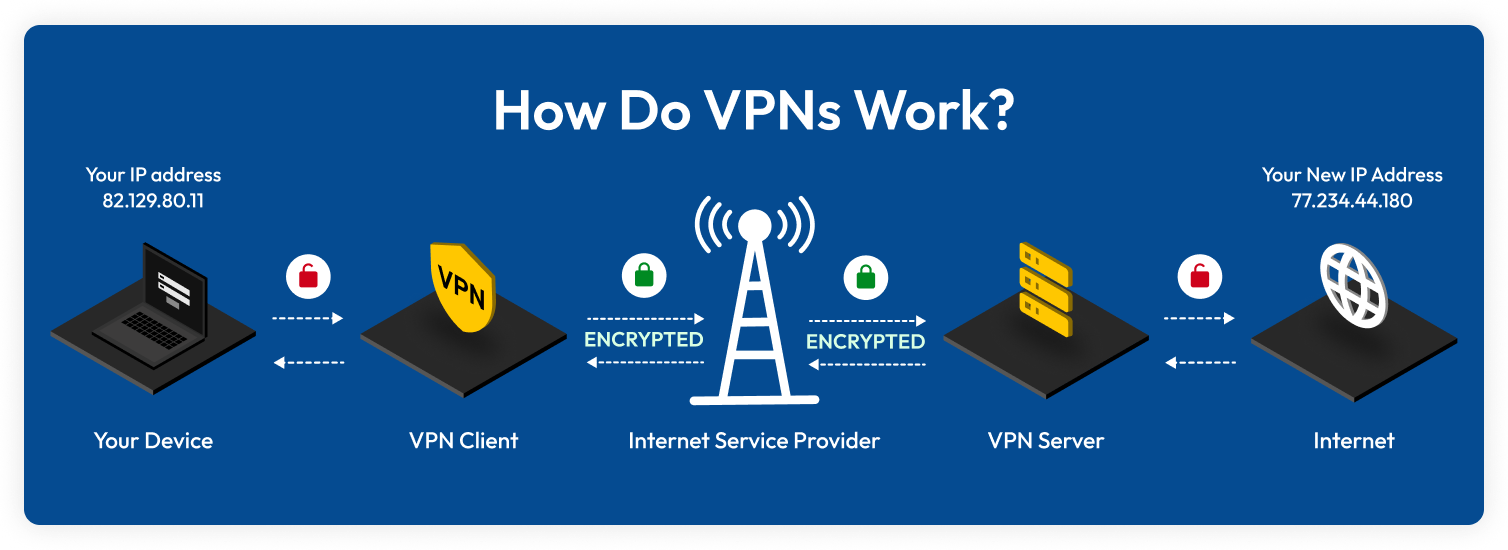
VPN split tunneling is a feature that allows some internet traffic to pass through the VPN while other traffic uses a regular connection. This configuration is useful when one application needs private network access, but other applications require direct connectivity for better speed or to reach local services.
This feature is not a replacement for a VPN, and it does not automatically make the entire device more secure. The outcome depends on which applications are excluded, the VPN provider’s policies, and how the operating system implements network routing. Before enabling it, it’s important to understand which traffic is protected and which is not.
What is VPN split tunneling?
In a standard VPN connection, most or all of a device’s internet traffic is routed through the VPN server. The public IP address visible to destination services is typically the VPN server’s address, not the source connection’s address. Split tunneling divides that path based on specific rules: only selected applications, IP addresses, or network destinations pass through the VPN tunnel.
Imagine a laptop being used to access a company portal and stream videos. The company portal can only be accessed via VPN, while the streaming service works better through a direct connection. With split tunneling, access to the company portal can go through the VPN, while video traffic doesn’t need to pass through the VPN server. However, the streaming service can still see the regular connection’s IP address.
To understand the fundamentals of these connections, also read the guide to VPNs, how they work, and their security limitations.
Two common ways to configure VPN split tunneling
Application-based split tunneling determines which applications may use the VPN. For example, a work browser and file management application are routed through the VPN, while a music app uses a direct connection. This approach is easy to understand because the rules follow applications, but behavior can differ between Windows, Android, macOS, and specific VPN clients.
Destination-based split tunneling selects which IP addresses or network ranges pass through the VPN. This method is often more suitable for accessing office networks or specific servers. The configuration requires more attention because service addresses can change, and overly broad rules might redirect traffic that doesn’t actually need to go through the VPN.
Menu names and available options vary across services. Some VPN applications only support application exclusions, while others provide destination-based rules. Check your provider’s documentation before following guides for specific operating systems.
When is split tunneling useful?
The most obvious use case is remote work access. A device can connect to internal company systems through the VPN while still using the local connection for general services that don’t require private access. This can reduce load on VPN servers and prevent irrelevant traffic from filling up company bandwidth.
This feature can also help when network printers, smart home devices, or local servers become unreachable while the VPN is active. If network policies allow, traffic to local devices can be excluded from the tunnel. For streaming or video calls, a direct path sometimes reduces latency, although results still depend on network quality and VPN server performance.
A practical example: an employee uses a desktop application to access a company dashboard through the VPN, but wants video conferencing to use a regular internet connection. They can exclude the conferencing application if the VPN client supports such rules and workplace policies permit it. Don’t apply exclusions before confirming that the application doesn’t send sensitive work data through unapproved paths.
Privacy and security risks to understand
The main risk is mistakenly assuming that all device activity remains protected by the VPN. Excluded applications will connect through the regular network, so the source IP address can be seen by destination services. If using public Wi-Fi, direct traffic also doesn’t receive additional protection from the VPN tunnel, although HTTPS still encrypts web connections that support it.
Split tunneling can also make organizational security policies harder to enforce. On work devices, administrators may require all traffic to pass through company security gateways. Excluding applications without authorization may conflict with such policies or create unmonitored pathways. For company devices, follow IT team rules rather than simply chasing speed.
Also pay attention to DNS and disconnections. Depending on VPN implementation, DNS requests from applications using direct paths may be handled by regular network resolvers. If the VPN disconnects, specific applications might fall back to direct connections. Features like kill switches don’t always handle exclusions the same way across products, so read your provider’s technical explanations.
If your primary goal is privacy, also understand the differences between network functions often considered similar. The article on DNS vs VPN differences explains why DNS settings alone don’t replace VPN path protection.
How to enable it more securely
Start with specific needs. Determine which applications or networks truly must use the VPN, then create the narrowest possible rules. Avoid excluding your main browser or all applications en masse if you haven’t understood what data each application transmits.
- Check whether your personal or work device permits split tunneling.
- Document which applications enter the VPN and which use direct connections.
- Test access to private networks, local services, and IP checker sites after applying rules.
- Ensure DNS, kill switch, and behavior during VPN disconnection meet your needs.
- Review rules after updating VPN applications or operating systems.
For testing, open internal services that genuinely require VPN access and verify they remain reachable. Then check the public IP address from intentionally excluded applications. Results should reflect your chosen paths, but one test doesn’t prove all traffic is configured correctly.
Is split tunneling right for everyone?
Not always. Split tunneling fits when there’s a clear reason to separate paths, such as accessing office networks or local devices. If your priority is routing all traffic through the VPN for simpler privacy rules, a full connection is usually easier to manage. Choose based on needs, not the assumption that more settings always mean more security.
In essence, split tunneling provides more granular control but also adds responsibility. Always know which applications are behind the VPN and which connect directly before relying on this feature for work or sensitive activities. VPN illustration: Shashikabir87, Wikimedia Commons, CC BY-SA 4.0. Image source.
Komentar (0)
Belum ada komentar. Jadilah yang pertama berkomentar.